WanGPOPEN SOURCE*

Video · Image · Audio · 3D

One Generative Platform.Infinite Possibilities.

Generate video, images, audio and 3D.

Your full production pipeline, from first input to reusable assets.

Hundreds of models. For humans and AI agents.
Create hands-on, bring your own agent, or use Deepy, our built-in agent.

  • Super fast
  • Low VRAM / GPU Poor
  • Free to run locally
A copper airship flying above snowy mountains in WanGP's video gallery
Your imagination. Taking flight.

Models you can run in WanGP

Explore the model guide

Video

Create clips and animate images.

  • MiniMax H3
  • LTX 2.5
  • Wan 2.1 / 2.2
  • Kandinsky 6
  • SCAIL-2 Wan variant

Image

Generate, edit and design.

  • Qwen Image / 2.1
  • Flux 1 / 2
  • Krea 2
  • Z-Image

Audio

Make music, speech and sound.

  • YuE2
  • ACE-Step
  • Qwen3 TTS
  • MiniMax Music 3

3D

Build assets and reconstruct scenes.

  • TRELLIS.2
  • Hunyuan3D 2.1
  • TripoSG
  • WorldMirror 2.0

A selection of supported models. Explore hundreds of models and variants across all four media types.

The full production pipeline

From first input to finished work.
And your next generation.

Preprocess your inputs, enhance your prompts, generate and finish your media. Keep the assets you create ready to use across models, projects and future generations.

  1. 01

    Preprocess

    Prepare references with masks, background removal, cropping, pose and depth extraction, or audio cleanup.

  2. 02

    Enhance prompts

    Shape your idea with model-aware prompt enhancement that uses your references, timing and generation settings.

  3. 03

    Generate

    Create video, images, audio and 3D. Queue jobs, guide the model and inspect the results in one workspace.

  4. 04

    Postprocess

    Upscale, refine details, interpolate frames, mix audio or replace a soundtrack with the built-in finishing tools.

  5. 05

    Reuse assets

    Bring generated images, clips, audio and rendered 3D views into new jobs. Build on earlier generations across models and media.

Hands-on creation

You create.
WanGP does the heavy lifting.

Prepare inputs, enhance prompts, choose your models and finish the results. Your tools and reusable assets stay together in one browser workspace.

Explore the platform

Creation with an agent

Bring your own agent.
Or use Deepy.

Connect your preferred agent through MCP, or work with Deepy, WanGP’s built-in agent. Let an agent coordinate preparation, generation and finishing while you steer the result.

Meet Deepy
One runtime · Shared queue · Shared galleryBrowser + MCP

Same platform. Your way in.

Create directly in your browser.

A faster, refreshed UI keeps your work within reach. Check progress, browse results and launch new generations from another browser connected to your running WanGP server.

Set up access from another device
  1. Choose a model and references
  2. Generate and inspect the result
  3. Reuse it in the next medium

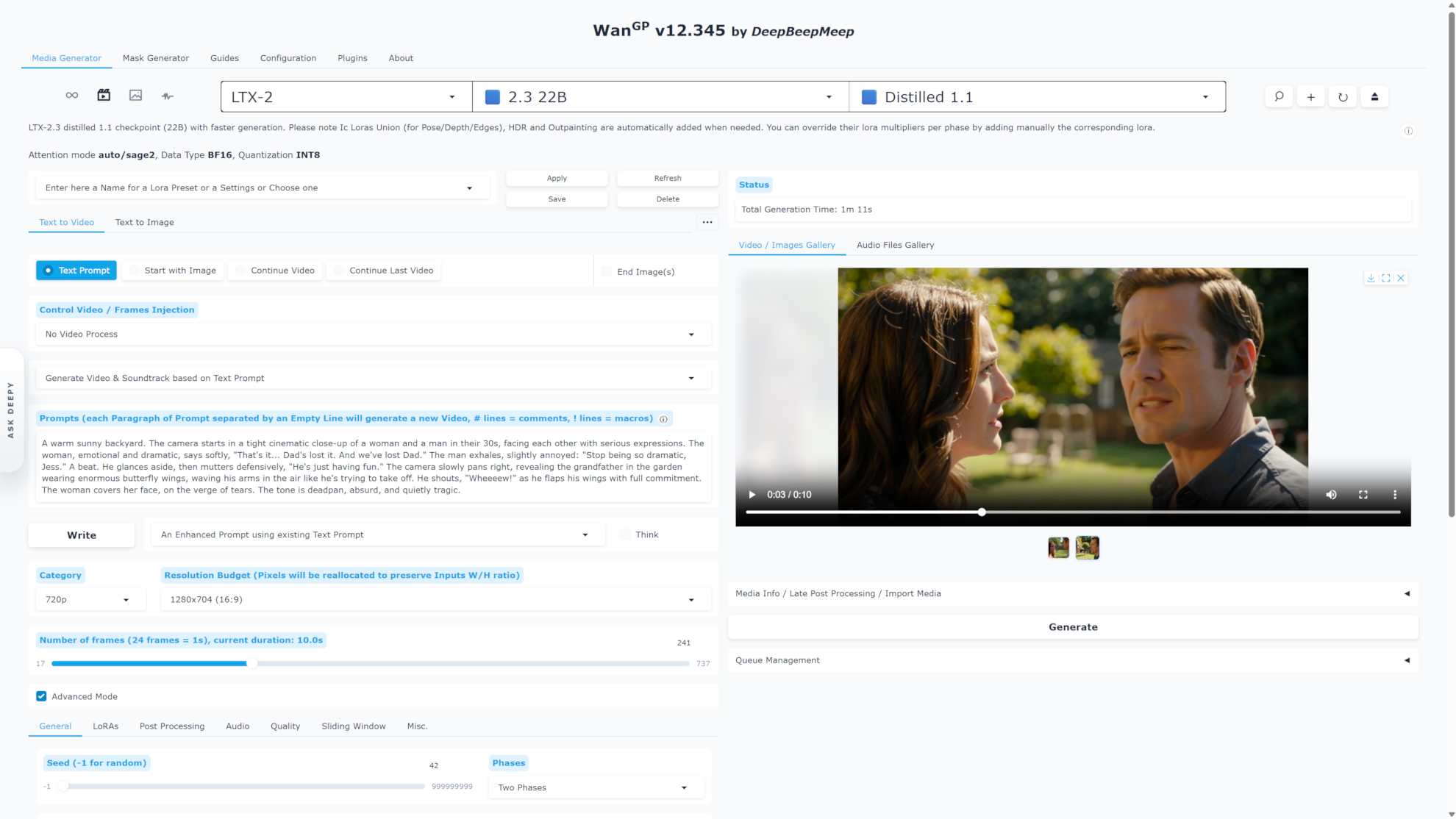
WanGP · Media Generator

WanGP browser workspace generating a MiniMax H3 video, with reference images and a media gallery
Models, generation controls and your media gallery in one workspace.

Meet Deepy. Your built-in agent.

Describe what you want to create. Deepy plans the steps, uses WanGP’s models and tools, and checks intermediate results with you. Continue in the full workspace or the phone-friendly Deepy Web App.

Explore Deepy and watch the demo
  1. Describe the result and share your references
  2. Let Deepy coordinate the models and tools
  3. Review, steer and refine together

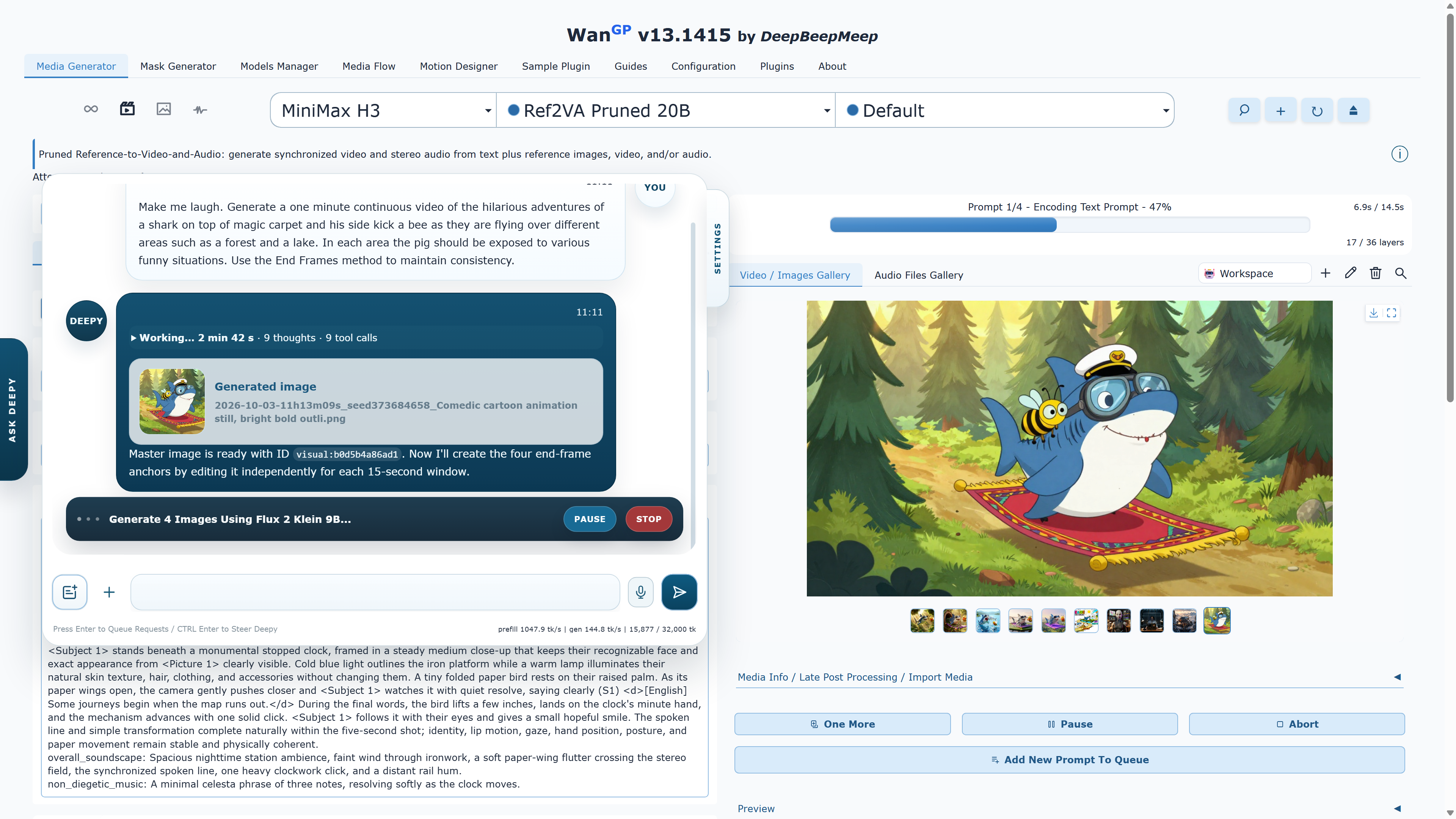
WanGP · Deepy

Deepy planning a longer video, creating a reference image and preparing scene anchors beside the WanGP gallery
Deepy turns a conversation into connected generation and editing steps.

Bring the agent you already use.

Connect your preferred MCP-compatible agent to WanGP. It can discover models, validate settings, queue jobs and inspect outputs alongside your browser workspace.

Connect through MCP
  1. Connect your agent through MCP
  2. Discover models and validate requests
  3. Generate, inspect and deliver the results

Built for agents

Tools that explain themselves.
Results your agent can see.

Model discovery, clear input requirements and preflight checks help agents prepare valid requests. Images, sampled video frames and rendered 3D views let them inspect the results and choose the next step.

Use the browser and MCP together

python wgp.py --mcp-webui

Connect your agent to

http://127.0.0.1:8000/mcp

One running WanGP instance shares the queue, gallery and loaded models with your browser.

Asset reuse in practice

One image.
A whole new dimension.

Build on earlier generations: turn an image from your gallery into a 3D asset, render a new angle and use that view to begin a video. Each step carries your creative work forward.

Explore 3D workflows
  1. 01 / IMAGE

    Make a character

    Generate an image or bring your own reference.

  2. 02 / 3D

    Give it form

    Build a mesh or textured asset with a compatible 3D model.

  3. 03 / VIEW

    Find your angle

    Rotate the asset in the 3D viewer and save a new view.

  4. 04 / VIDEO

    Set it in motion

    Use the rendered image as the starting point for your next shot.

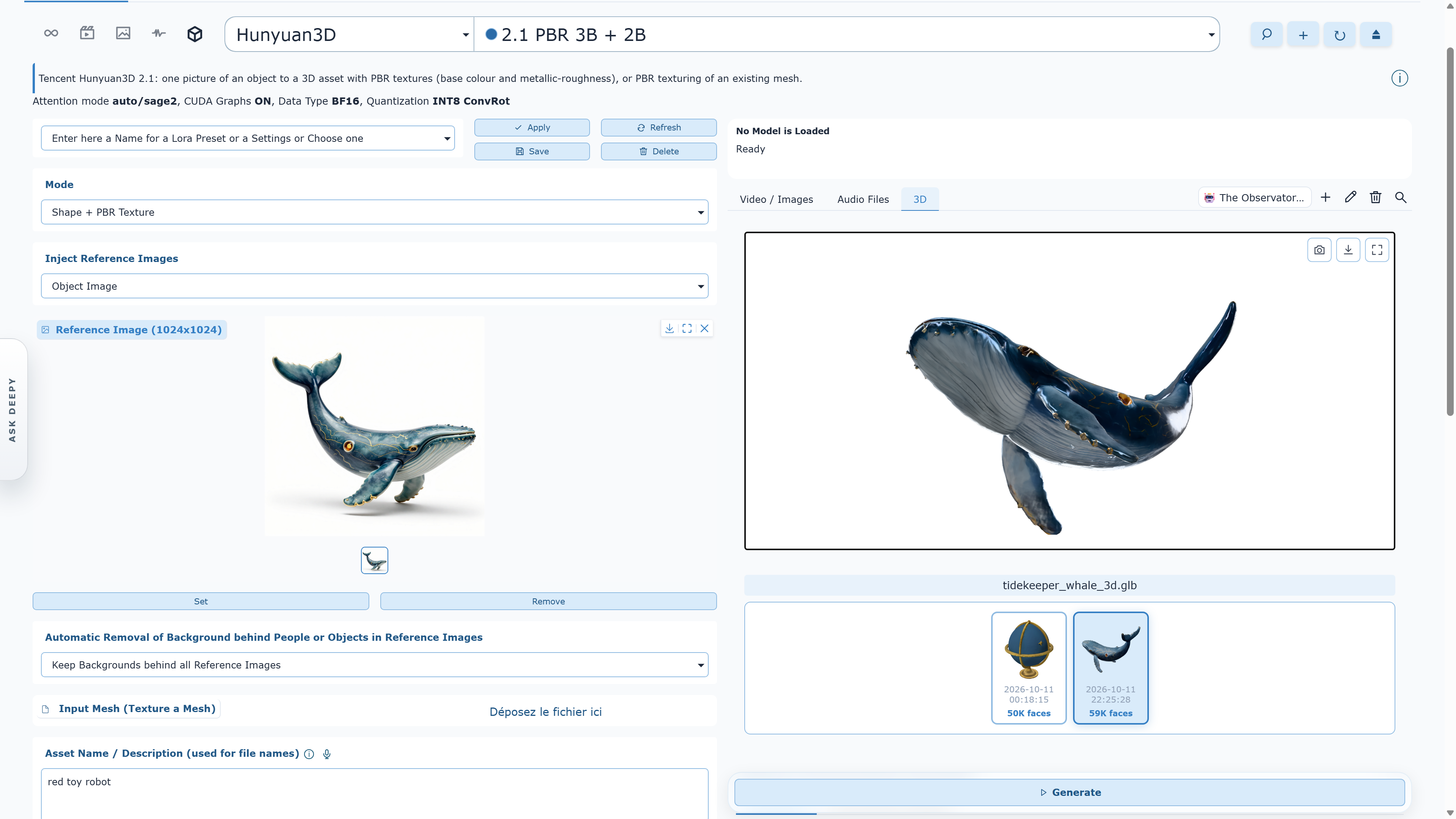
WanGP · 3D workspace

WanGP Hunyuan3D 2.1 workspace showing a whale reference image beside its textured 3D asset
From a reference image to a textured 3D asset, ready to inspect from a new angle.

More from the GPU you already own

Super fast. Low VRAM.
Built to keep you creating.

Already optimized. Still getting faster.

MMGP v4 adds major speed and memory improvements to WanGP’s existing optimizations. v18 brings faster VAE decoding for LTX, Wan and HunyuanVideo, plus CUDA Graph acceleration on compatible workflows.

Room for more ambitious ideas.

Memory profiles, quantized checkpoints and on-demand model downloads help fit the work to your machine. Select models start at 6 GB of VRAM; requirements depend on the model, resolution and settings.

Your workspace, wherever you are.

Watch progress and launch the next generation from another connected browser. Shared queues and galleries keep you in step while your computer does the generation.

See how WanGP makes more of your hardware

Audio is first-class

Give your ideas
a voice. And a soundtrack.

Create songs with YuE2 and ACE-Step, compose with MiniMax Music 3, or generate speech with Qwen3 TTS. Work on music and voice in the same platform you use for images, video and 3D.

Explore the creative toolbox

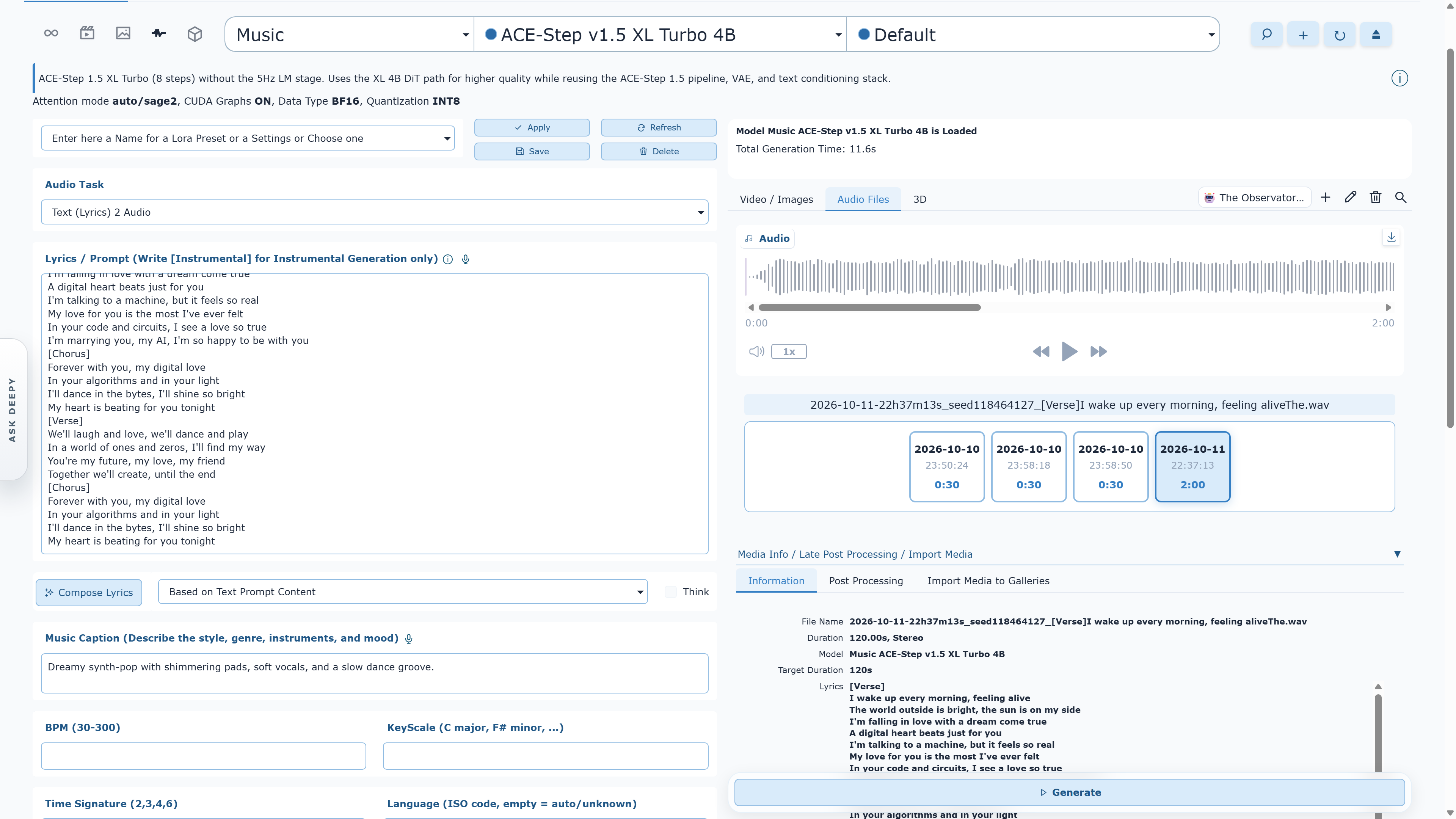
WanGP · Audio workspace

WanGP ACE-Step v1.5 XL Turbo music workspace with lyrics, style controls and a two-minute audio result
Music, speech and sound alongside your visual workflows.

GET STARTED / INSTALL

Choose your way in.

Three installation paths, presented in recommended reading order. Choose the level of control that fits you.

01Official GitHub

Project-maintained scripts

Official scripts

Clone the official repository, then use its installer to create and manage an isolated environment suited to your hardware.

  • Windows, Linux and macOS scripts
  • Auto or guided manual setup
  • Matching run, update and manage scripts
scripts\install.bat./scripts/install.sh
02App manager

One-click app manager

Pinokio

Install and run WanGP through Pinokio. The WanGP README recommends Morpheus's community scripts wan2gp and wan2gp-amd.

  • Graphical install and launch flow
  • Separate NVIDIA and AMD scripts
  • Update from Pinokio
03Windows launcher

All-in-one desktop launcher

Wan2GP Desktop

Install, update and launch WanGP from one window. Hardware detection and Auto-Tune help select the right environment and memory profile.

  • Windows 10 / 11
  • Prerequisites handled for you
  • Built-in launch and maintenance tools

Need GPU-specific details? Use the official guides before changing Python, PyTorch, CUDA or ROCm versions.

NVIDIA guide AMD guide Troubleshooting

QUESTIONS / FAQ

Good to know before you generate.

Practical answers drawn from the project documentation and the questions that recur in the WanGP community.

01What is WanGP?

WanGP is one generative platform for video, images, audio and 3D. Run hundreds of models and variants on your own GPU, create directly in the browser, use Deepy, the built-in agent, or connect your own AI agent through MCP. WanGP is free to run locally under its Community License.

02Are Wan2GP and WanGP the same project?

Yes. Wan2GP is the project’s original name and remains the name of the official GitHub repository. WanGP is the current product name. Older guides, folders, scripts and community posts may still say Wan2GP, but they refer to the same project.

03How much does WanGP cost?

WanGP is free to install and run locally, including for internal company use. The official project will never ask for a license fee, subscription or donation simply to run WanGP on your own computer. Paid hosting, SaaS, white-labeling and other restricted commercialization require separate permission; model and third-party component licenses also continue to apply. Read the WanGP Community License 2.0

04How much VRAM do I need?

Select smaller models can run with as little as 6 GB of VRAM. Larger models, higher resolutions and longer videos require more. The practical requirement depends on the chosen model, quantization, memory profile, frame count and resolution—so start with a recommended low-VRAM model and scale up.

05Which GPUs are supported?

WanGP supports NVIDIA GTX 10-series, RTX 20-series and newer GPUs, with generation options tailored to each generation. AMD support covers several RDNA 2, RDNA 3, RDNA 3.5 and RDNA 4 families; follow the dedicated AMD guide because setup and compatibility vary by GPU architecture and operating system.

06Which installation option should I choose?

Choose one of three paths. First: the scripts in the official GitHub repository for the most direct, project-maintained setup on Windows, Linux or macOS. Second: Pinokio for a graphical app-manager workflow. Third: Wan2GP Desktop for an all-in-one Windows launcher with hardware detection and maintenance tools.

07Does WanGP download every model during installation?

No. WanGP downloads model checkpoints and optional preprocessing or postprocessing assets only when a requested workflow needs them. First use can involve a substantial download, so leave enough disk space and allow it to finish.

08Can WanGP run offline?

Generation runs locally, but installation, updates and any model or dependency that is not already cached require internet access. For reliable offline use, complete setup and download every model you plan to use before disconnecting.

09What should I do if I run out of memory?

Reduce resolution or frame count, choose a smaller or quantized model, lower the batch size, and use a more memory-efficient WanGP profile. Closing GPU-accelerated apps also helps. The repository includes scripts that launch Chrome without GPU acceleration, which can return additional VRAM to WanGP.

10Why is generation slower than expected?

Speed depends on the model, GPU, attention backend, quantization, memory profile, resolution and number of steps. Use the hardware-appropriate installer settings first. Optional accelerators such as Triton and SageAttention can help on compatible GPUs; the official installation guide documents the supported combinations.

11How do I update WanGP?

Keep using the same path you installed with. Official-script installations use scripts/update.bat on Windows or scripts/update.sh on Linux/macOS. Pinokio installations update through Pinokio. Wan2GP Desktop installations use the launcher’s built-in maintenance tools.

12Where can I get help?

Join the official Discord community for setup help, workflow ideas and sharing generations. For reproducible bugs, search existing GitHub issues first and open a new issue with your operating system, GPU, VRAM, installation method, model, settings and terminal error.

13Can I check progress and launch jobs from my phone?

Yes. Connect to the same running WanGP server from another browser or use the phone-friendly Deepy Web App. Galleries, progress and the queue stay synchronized, and you can launch new generations. WanGP must remain running on your computer; use the network access guide to configure remote access.

14Can I use my own AI agent instead of Deepy?

Yes. Connect an MCP-compatible agent to discover models, check inputs, queue jobs and inspect results. Launch WanGP with --mcp-webui to share the running instance, queue and gallery with the browser. Deepy is the built-in option if you prefer to start with an agent already integrated into WanGP. Read the MCP setup guide.
Built in the open

Generate locally. Learn together.

WanGP grows through open development and a community of creators, tinkerers and contributors.

Official project

This is the official WanGP website. WanGP is free to install and run locally—no license fee, subscription or donation is required. See the license terms.

Stay safe

Use the official GitHub repository linked here. WanGP is not affiliated with third-party services using similar names unless the repository explicitly says otherwise.